
What's New
We’ve created a cleaner, smarter way for users to access Raise inside the Snap! Mobile App and Tier 3 FanX apps. This update introduces role-based fundraising access paths, ensuring each user lands in the right place based on their role in the app. This new experience replaces the existing Fundraising Promotion Card and is now its own dedicated card type.
What This Update Does
- Replaces the old fundraising promotion card
- Dynamically adjusts options based on user role
- Routes users directly into Raise so they land exactly where they should
User Experience by Role
All fundraising actions require the user to be signed in.
All Users
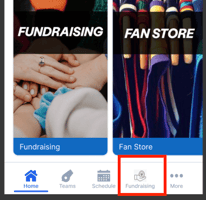
All users will see a "Fundraiser" icon in the bottom menu to open the Raise experience easily.
Participants
The participant user flow will remain unchanged.
- New Users: Enter their join code after creating a new account and immediately enter the participant onboarding flow.
- Existing Users: Log in and click on the fundraiser card and see existing campaigns with the option to enter a join code for a new campaign.
-2.png?width=319&height=328&name=image%20(3)-2.png)
Group Leaders / Guardians
- After joining a campaign through the web or app, group leaders will see a new screen when they return to the fundraiser card or click on the new fundraiser icon in the bottom menu. They will be presented with two options:
- Manage My Fundraisers → Opens the page listing any campaigns they are already part of, with the option to enter a code to join a new campaign.
-2.png?width=166&height=358&name=image%20(4)-2.png)
- Donate to Active Fundraisers → Opens a page showing a list of all active fundraisers under their school within the app. Selecting a campaign will open the fundraiser page where they can donate to the group.
- Donations from these pages will be tracked in Raise under "App" as the donation source.
-Mar-03-2026-04-06-35-8345-PM.png?width=163&height=350&name=image%20(2)-Mar-03-2026-04-06-35-8345-PM.png)
All Other Users (Supporters / Fans)
Any user who doesn't have a participant or group leader role willsee the screen to Donate to your Favorite Causes when they click on the fundraiser card or fundraiser icon in the bottom menu.
Then, a list of all active fundraisers under that school will display. Selecting a campaign will open the fundraiser page where they can donate to the group. This unlocks a new donation source for our Raise groups.
‼️ Note: If a participant or Group Leader lands on this page and needs to join a fundraiser, they can click on Looking to participate in a fundraiser? and they will be routed to the join screen.
-Mar-03-2026-04-06-35-8345-PM.png?width=174&height=374&name=image%20(2)-Mar-03-2026-04-06-35-8345-PM.png)