
Support and Reps can enable or disable sponsorships as needed.
👉 Reps should make these changes themselves and do not need to contact Support for help.
⚠️ Important: Sponsorships cannot be disabled if a sponsorship has already been purchased. The Sponsorship must be refunded before the feature can be disabled.
If a sponsorship needs to be refunded, the Rep should contact Support for assistance.
Steps:
1. Locate the campaign on our Internal tool
2. Scroll down to "Fundraiser Features"
3. Turn the feature on or off
* IF SPONSORSHIPS EXIST- MUST REFUND BEFORE TURNING OFF*
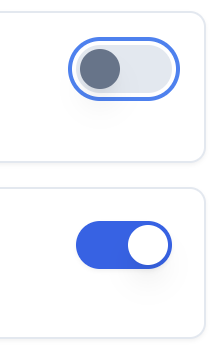
This means the feature is turned off
This means the feature is turned on
4. Click Save