Refund a Specific $ Amount
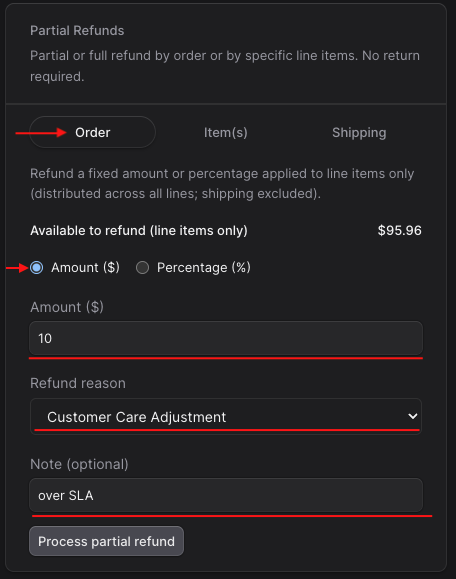
Follow the steps below to refund a specific dollar amount from an entire order.
- Locate the order and find the Partial Refunds section to the bottom right of the page
- Toggle to Order (should be pre-selected)
- Select Amount (should be pre-selected)
- Enter the amount
- Select refund reason
- Add optional note
- Select Process Partial Refund
Refund a Specific Item(s) from the Order
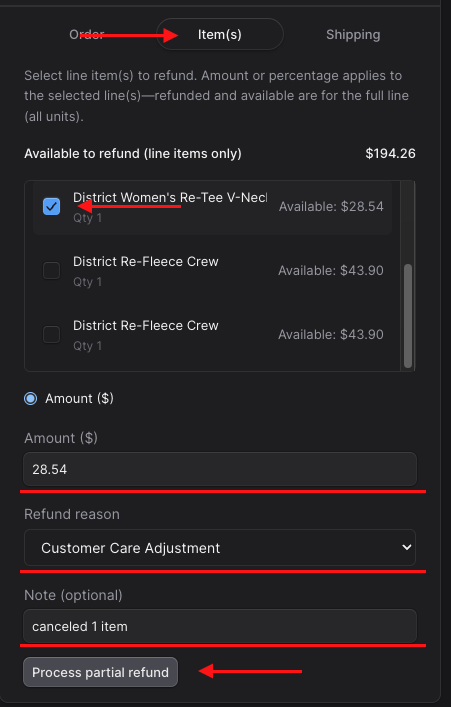
Follow the steps below to refund specific item(s) from the entire order.
- Locate the order and find the Partial Refunds section to the bottom right of the page
- Toggle to Item(s)
- Select the items you want to refund
- Enter the amount to refund. This should equal the amount of all of the items selected. In this example below, we are refunding one item that costs $28.54 with tax included.
- Select refund reason
- Add optional note
- Select Process partial refund
Refund a Specific % from the Order
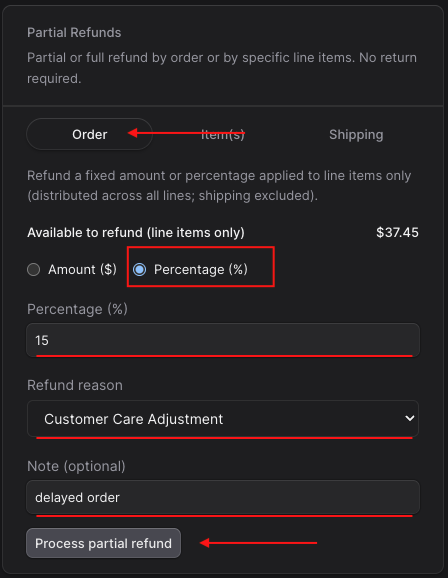
Follow the steps below to refund a specific percentage from the entire order.
- Locate the order and find the Partial Refunds section to the bottom right of the page
- Toggle to Order (should be pre-selected)
- Select Percentage
- Enter Percentage
- Select refund reason
- Add optional note
- Select Process partial refund
Refund Shipping
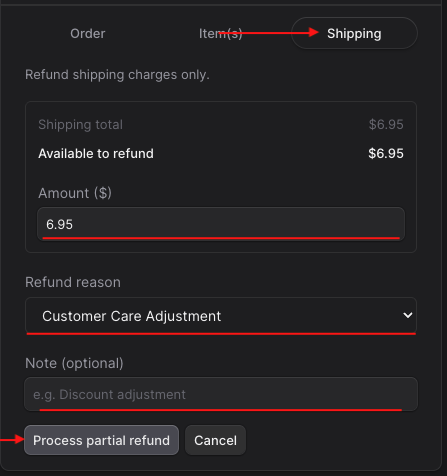
Follow the steps below to refund shipping from the entire order.
- Locate the order and find the Partial Refunds section to the bottom right of the page
- Toggle to Shipping
- Enter shipping amount
- Select refund reason
- Add option note
- Select Process partial refund