

As a Store Admin, you have the ability to withdrawal your points in the form of a check.
Please see a few key notes:
- A Store must have a minimum of 50 points ($50) to request a check withdrawal.
- This requirement was previously 100 points
- Checks are delivered within 2-3 weeks
- The payable name on the check will automatically be tied to fundraising campaigns organization
- If this needs to be changed or updated, you will have the ability to do so when requesting a withdrawal
Steps to redeeming points:
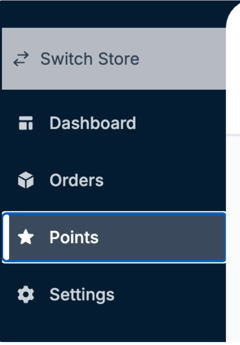
1. From your Store dashboard, click Points on the left hand side
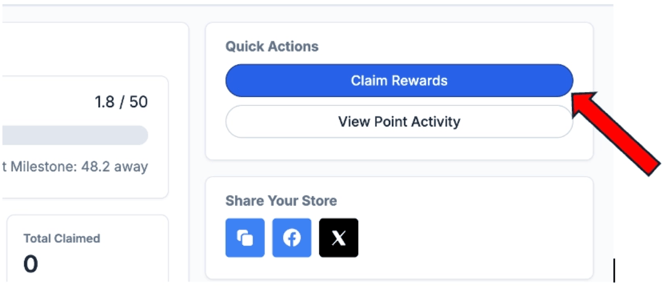
2. Click Claim Rewards
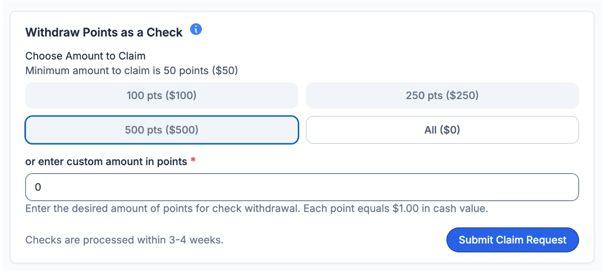
3. Select how many points you would like to redeem OR enter the custom amount
- Reminder- You must have at least 50 points available to withdrawal
4. Please be sure to confirm the payable organization and mailing address details on the right hand side
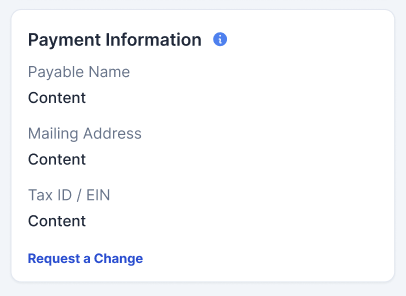
If the address or organization is incorrect, you can click Request a Change which will direct you to a separate form to submit updated information
5. Once you've confirmed the payout amount and the payable organization, click Submit Claim Request
8. You will receive confirmation from our Support team within 48-72 hours that we have received your request and an update on your check.
If you have any questions at all, please reach out to our support team at support@snap.store and we will be happy to assist!