

For a check deposit, the check must be made payable to the program's legal name. Checks can only be deposited from a mobile device.
How to make a Mobile Deposit
You can click the link below to watch an instructional video on how to make a mobile deposit, or you can follow the step-by-step instructions below!
Step-by-step instructions
-
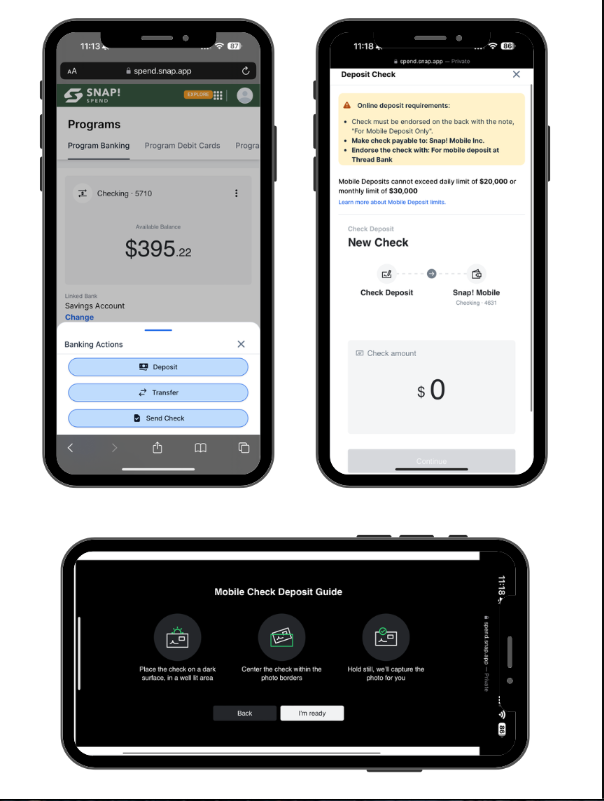
Sign in to your Snap! Spend account on a mobile browser.
-
Click the blue icon in the bottom left-hand corner.
-
Select Deposit.
-
Enter the check amount.
-
Make sure the amount entered matches the amount on your check. Note: Check the daily deposit limit on the mobile deposit form to make sure the check amount can be accepted.
-
Endorse the back of the check with "For mobile deposit only at Thread Bank" and your signature.
-
Turn your phone sideways, and read the onscreen prompts to ensure the check can be captured correctly.
-
Tap I'm ready to capture.
For best results:
- Use a mobile device or smartphone
- Place the check on a dark, plain surface with good lighting
- Position the camera directly over the check (not angled)
- Center the check on the screen and be sure all four corners are visible on your screen
-
Make sure your deposit information is correct, and then select Deposit.
-
You’ll get an on-screen confirmation that your mobile deposit has been recorded. You will be able to see it under Pending Transactions with the status of Processing.
-
After your deposit, we recommend keeping the check secure for 5 days before tearing it up.
-
Once the deposit has settled, the transaction will appear in the Settled Transactions section.
Additional Notes
Ineligible Checks
Checks may not be accepted if they are:
- in a currency other than US Dollars
- payable to someone other than the end customer
- savings bonds or traveler's checks
- have already been deposited
- not readable
- checks without a date, have been post-dated, or are more than 6 months old
Mobile Deposit Limits
Yes, you can only deposit an amount that is equal to or under the daily deposit limit as listed in the mobile deposit form.
Cut Off Times
Your check image must be received by 3:00 pm PST to be considered deposited on the same day. Any check image received by us after 3:00 pm PST will be considered as deposited in the following business day.
Funds Availability
Once you have submitted a deposit, your funds will be available within 3-5 business days.
Check Deposit Status
| Status | Description |
|---|---|
AwaitingImages |
The check deposit was created. Waiting for the front-side and back-side images to be uploaded. |
AwaitingFrontImage |
The back-side image of the check was received. Waiting for the front-side image to be uploaded. |
AwaitingBackImage |
The front-side image of the check was received. Waiting for the back-side image to be uploaded. |
Pending |
The check deposit was created on the Unit ledger but was not yet processed. Check deposits with Pending status may be canceled by the originator. |
PendingReview |
The check deposit is pending review by the Bank. |
Rejected |
The check deposit was rejected (see reason for more details). Some rejections are immediate but some can take up to a couple of days. |
Clearing |
The check deposit was processed and the funds have been received by the Bank, but the deposit account was not credited yet. The check deposit will stay clearing for a period of time as defined on the deposit product, for fraud risk mitigation reasons. It's recommended that the physical check is kept securely until the end of the statement cycle. |
Sent |
The check deposit was processed and the deposit account was credited. This is the final state for successful check deposits. |
Canceled |
The check deposit was canceled. |
Returned |
The check deposit was processed but the receiving bank was not able to complete the transfer (see reason for more details). |
AwaitingCustomerConfirmation |
The check deposit requires the customer's attention: either retaking the images or confirmation check deposit amount. If no action is captured within a 10 minutes window, the check deposit will automatically be Rejected. This status is not part of all check deposit's lifecycles and mainly depends on a bank partner. |
Check Deposit Rejection Reasons
Below is a list of some of the more common rejection reasons for check deposits
| Reject Reason | Description | Required Action |
|---|---|---|
| Altered / Fictitious | Check appears to have been altered or forged. | Request a new check from the counterparty |
| Suspected Counterfeit | Request a new check from the counterparty | |
| Missing Endorsement | Endorsement area is blank. | Sign back of the check |
| Cannot read check | Retake photo of check. Ensure proper focus, good lighting and that all four corners are visible. If the issue persists | |
| Date Issue | A check is either undated, post-dated or stale-dated. | Replace with a check with a valid date (date cannot be a future date, older than 6 months or outside of a "void by" date specified on the check. |
| Check has already been submitted | This check cannot be accepted again | |
| Missing Signature | Unsigned by maker. | Request a new check from the counterparty |
| Beneficiary Name Mismatch | Beneficiary name does not match the customer name. | Make sure the name on the check matches the one on the account. |
| Check processing failed | Please try again. | |
| No check uploaded | Please try again. | |
| Cannot read Account data on bottom of check | Retake photo of check. Ensure proper focus, good lighting and that all four corners are visible | Please try again. |
| Unable to read account information due to interference from signature or other markings. | Request a new check from the counterparty | |
| Incomplete Check | Any of the required check elements are not visible, or if the customer did not upload both the front and back of the check. | Please try again. |
| Amount Mismatch | The legal amount (written out) does not the match numeric amount or the amount entered by the customer when the check deposit was submitted. | Request a new check from the counterparty |
| Blank Check | Request a new check from the counterparty | |
| Duplicate Check | Check may have been deposited before. | Please try a different check. |
| Partial Endorsement | Check is missing either endorsement signature or restrictive endorsement. | Please try again with all required endorsements. |
| Session Expired | The allowed time frame for confirmation has passed. See Customer Confirmation | Please try again. |
Still have questions or need help? Please reach out to us directly at spend.support@onsnap.com or by phone at 276-531-9260.
Spend is a financial technology company and is not a bank. Banking services provided by Thread Bank; Member FDIC. The Spend Visa Debit is issued by Thread Bank pursuant to a license from Visa U.S.A. Inc. and may be used everywhere Visa cards are accepted.
Your deposits qualify for up to a maximum of $2,500,000 in FDIC insurance coverage when placed at program banks in the Thread Bank deposit sweep program. Your deposits at each program bank become eligible for FDIC insurance up to $250,000, inclusive of any other deposits you may already hold at the bank in the same ownership capacity.
You can access the terms and conditions of the sweep program at https://thread.bank/sweep-disclosure/ and a list of program banks at https://thread.bank/program-banks/. Please contact customerservice@thread.bank with questions on the sweep program.