

You can duplicate events in your Leagues Conference to a different team or level. This will not delete the events in the original team/level, but is an easy way to copy events over if needed.
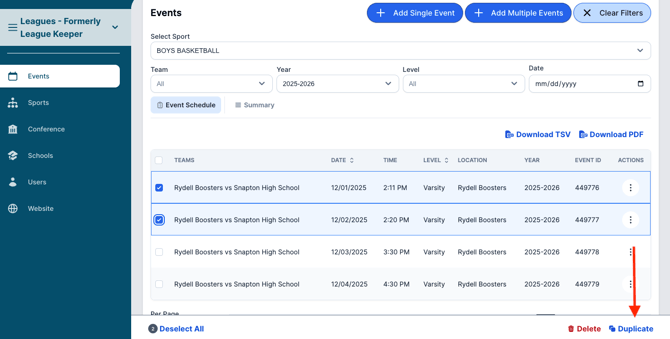
1. From the Events tab, select the team and check the events you want to duplicate.
2. Click "Duplicate" at the bottom right corner of the page.
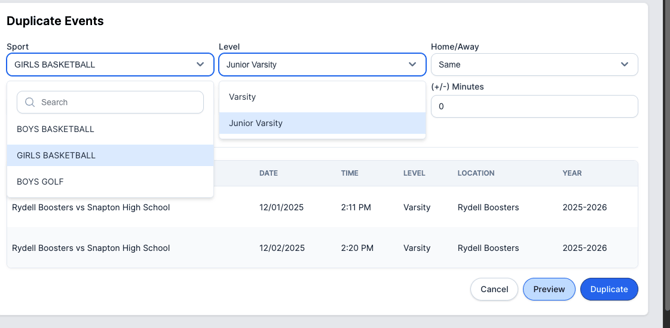
3. Select the right team or level you need to duplicate the events to. You can also update if the game is home or away, and offset the time if needed.
4. Click "Preview" to see how the events will be listed under the new team or level.
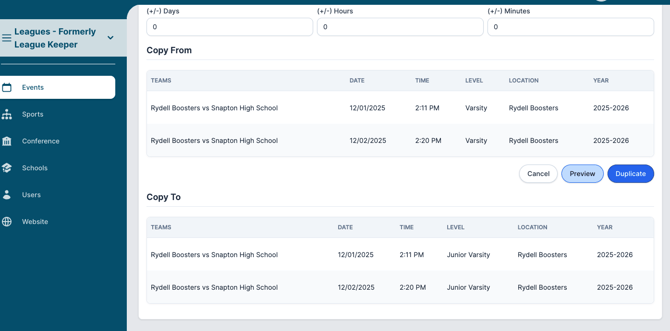
5. If everything looks correct, press Duplicate to finish duplicating the events!
Need Additional Help with Leagues? For assistance with using the Leagues platform or if you encounter technical issues, please reach out to our support team through the help features within the platform or our designated support channels (via the helpdesk widget, emailing manage.support@snapraise.com, or by phone at 276-531-9260, ext 3.)