
You can pay your invoice for Snap! Spend by paying via "Pay with Bank Account" or "Pay with Card"
Pay with Bank Account: During this process, you will be able to enter account ACH and Routing information.
Pay with Card: If you have debit cards associated with your account, you can also use the Spend debit card to pay the invoice. Just click the Pay with Card button on the invoice and enter in the card details associated with your account
To find your ACH and Routing information in Spend, please visit the banking tab of the program or group account you will be debiting from, then click the three-button menu next to your available balance to view your ACH and Routing information.
Receiving your Snap! Spend Invoice
Once you receive your invoice from us, click the button that says Pay with Bank Account (screenshot below).
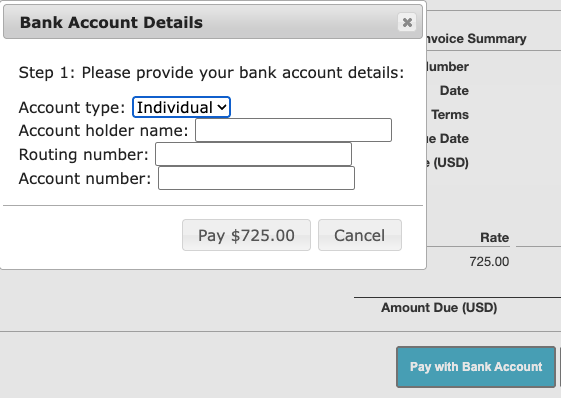
To find your ACH account details, log in to your Spend account, select either your Program Account or Group Account, and click the three dots next to the account name. A pop-up will appear showing the account and routing numbers you will need to enter to pay the invoice.
Additionally, you can use funds from other group accounts you have collected to help pay an invoice. To do this, you would first transfer funds from the other group accounts into the main account, then use that balance to pay the invoice from the account you would like to debit. (See Transferring Funds Internally)
Snap! Spend is a financial technology company and is not a bank. Banking services provided by Thread Bank; Member FDIC. The Snap! Spend Visa Debit is issued by Thread Bank pursuant to a license from Visa U.S.A. Inc. and may be used everywhere Visa cards are accepted.
Your deposits qualify for up to a maximum of $2,500,000 in FDIC insurance coverage when placed at program banks in the Thread Bank deposit sweep program. Your deposits at each program bank become eligible for FDIC insurance up to $250,000, inclusive of any other deposits you may already hold at the bank in the same ownership capacity.
You can access the terms and conditions of the sweep program at https://thread.bank/sweep-disclosure/ and a list of program banks at https://thread.bank/program-banks/. Please contact customerservice@thread.bank with questions on the sweep program.