

Administrator Resources
When setting up Registration for a new school year, you can reuse past activities, as well as create new ones.
If you are looking to add new activities, follow the steps in THIS ARTICLE.
Manually Opening Activities in the New School Year
Manually opening past activities for the upcoming school year is a great option if you plan to take payments or registration early, before summertime. If you do not plan to open Registration before mid-summer, you can select the Automatic Year. Otherwise, when you go to open your registrations during the next school year, the new seasonal year will already be selected for you to reopen the activity with.
To manually reopen past activities for next year, follow these steps:
- Log in to Registration.
- Select the Home tab in the left side navigation menu.
- Select the Registration Setup tab in the top navigation menu.
- Locate the Group you would like to open for next year and click into it.
- Click "Seasonal Year" and select the correct year to open. You may see "Create" in front of the year. This just means the season has not been created yet, but you can still proceed with this step.
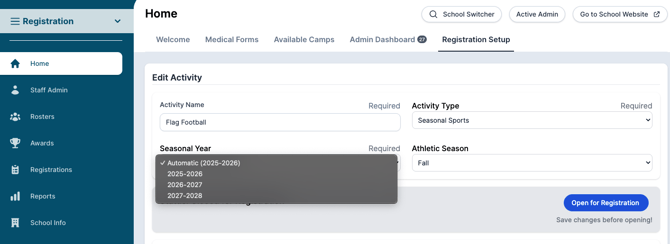
6. Update any legal forms, fee, groups, lead-in message or footer as needed.
7. Scroll to the bottom of the page and click "Save Changes".
8. Once saved, click "Open for Registration" to open registration.
‼️ This will NOT open your Registration. Once you have verified that all information is updated, then click the blue button towards the top labeled "Open For Registration". A registration is opened only by interacting with the "Open For Registration" button.
Should you need to close registration at any point, interact with the blue "Close Registration button".
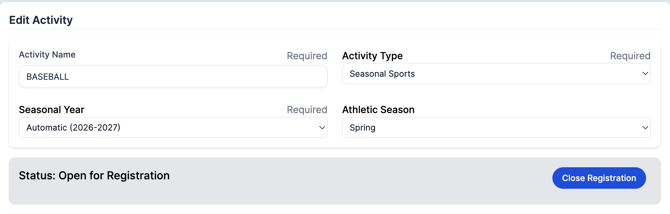
Selecting Automatic Year
Commonly, schools will use the "Automatic" Year.
This "Automatic" Year is updated in the mid-summertime by Snap! Manage, and selecting this will mean that the seasonal year will automatically be updated in the activity during the summer.
This automatic field does not open the activity, it only designates that the seasonal year rolls over without manual input.
You can select this option if your school does not open Registration until school is about to begin for the new school year.
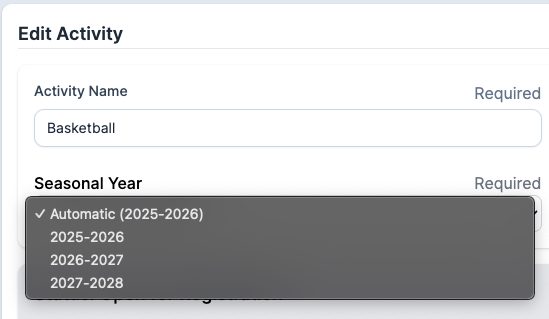
‼️NOTE: Only editing the seasonal year or updating the year to Automatic will not open your Registration. Once you have verified that all information is updated, then click the blue button towards the top labeled "Open For Registration".
Still have questions or need help? Please reach out to us directly at manage.support@snapraise.com or by phone at 276-531-9260 option #3.