
Introduction to Rewards
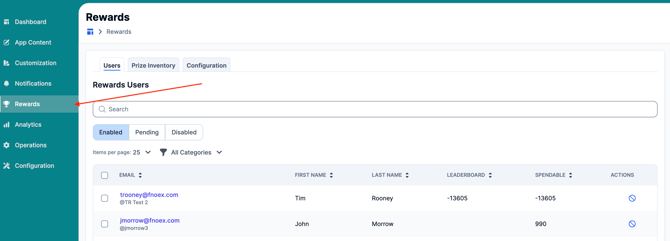
The rewards feature in your Admin Portal to gives you more control, visibility, and flexibility when managing your prize inventory.
To view the self-guided training for FanX Rewards, use the training link below:
Begin Training: Manage Rewards: Configuration, Inventory, & Users
Better Inventory Tracking
Until now, the Rewards feature only allowed you to see general information and a redemption history. With the new update, you can now:
- Track exact prize quantities
- Set low inventory alerts
- Auto-hide fully redeemed prizes
- Filter and sort rewards by availability status
✅ Key Enhancements
1. Prize Inventory Creation
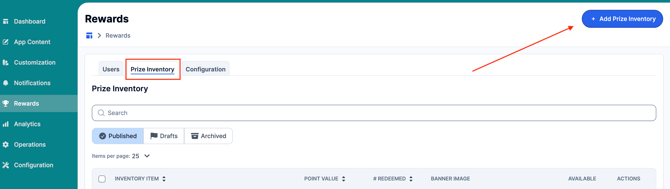
When you navigate to:
Admin Portal → Rewards → Prize Inventory List → Add Prize Inventory button,
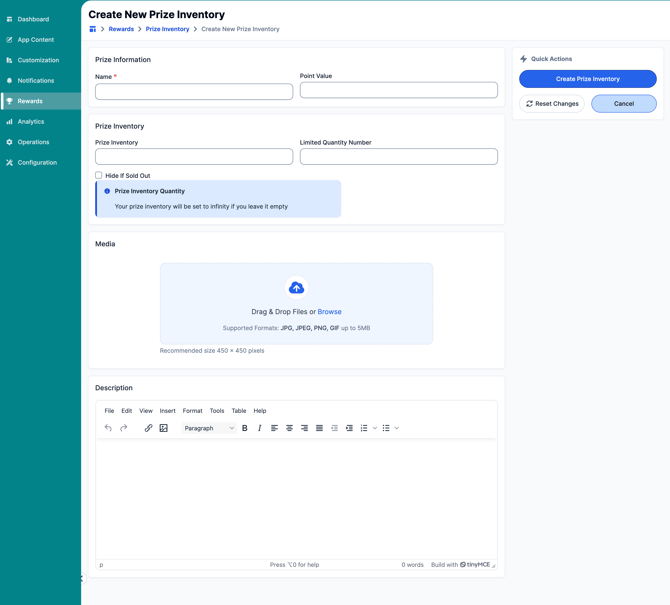
you’ll now see a new set of fields to better manage each prize.
-
Prize Inventory – Set the total number of units available for this prize.
- Inventory will be set to infinity if left empty
-
Limited Quantity Number – Choose the quantity at which a "Limited Quantity" warning (yellow label) will display in your app.
-
Hide if Sold Out– Select this option if you’d like a prize to be automatically removed from the app once it's fully redeemed.
-
If unchecked, the prize will remain visible in the app with a Sold Out label.
-
If checked, the prize will automatically disappear from the app when fully redeemed.
-
2. Improved Filters & Visibility
When viewing your Prize Inventory List, you’ll now be able to quickly filter and sort by status:
-
Available prizes
-
Sold Out prizes
-
Redeemed
Be sure your app is configured to pull the new data fields so users can see real-time prize status updates.
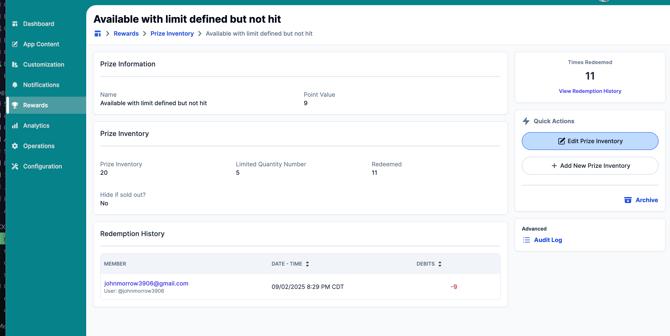
You can view individual stats on each prize by clicking the Prize name in blue under the Prize Inventory list
3. Reward Configuration
When viewing the configuration tab or rewards, you will have the option to configure:
- Introduction to Rewards
- Introduction Image
- Introduction / Opt-In Title
- Introduction / Opt-In Message
- Prize Redemption Message
- Rules & Regulations Settings
- Settings to Reset all rewards user to zero credits and debits.
- Prize Redemption Emails: Add any email here that would like to be notified when a prize is redeemed.
- Set up Membership Groups
- Set up Rules and Regulations Information
- Set up Email Registration Mandatory Text
Option to export a list of Check-ins can be found under Reward Configuration.
If you have any questions or need support implementing these new features, feel free to reach out to our support team! fanx.support@snapraise.com.