

❗For information on what Organization Settlement locking is, please check out this article.
How to Set Up Organization-Level Financial Settings
If you haven't completed Vault yet:
When you click Get Started on the financial profile banner in Insights, you'll now see a three-step setup flow:
- KYB (Know Your Business)
- KYC (Know Your Customer)
- Default Settlement Method (new)
If you've already completed KYB/KYC:
Return to your Financial Profile in Insights to add your org-level settlement method. A banner on your dashboard will prompt you to complete this step.

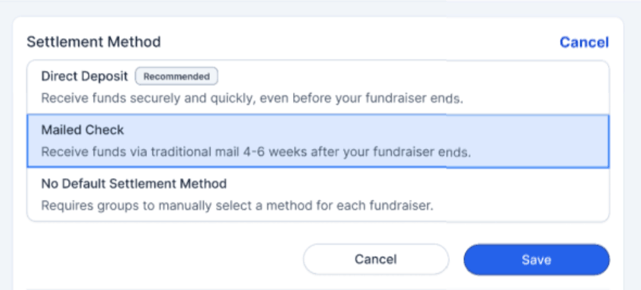
💰Default Settlement Method Options
- Direct Deposit
→ Link a bank account securely - Mailed Check
→ Enter a mailing address for check delivery - No Default Settlement Method
→ Opts out; no default will be applied to fundraisers
🔒 Can I lock the settlement settings?
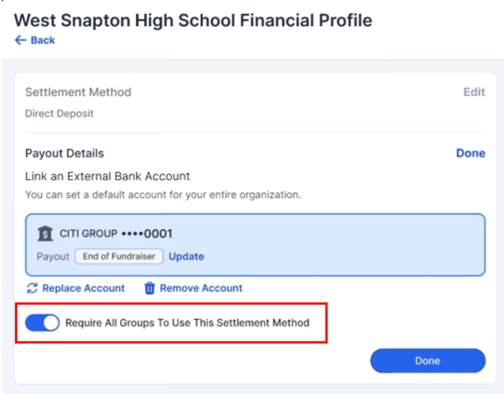
Yes. After selecting Direct Deposit or Mailed Check, you’ll see this option:
“Require all groups to use this settlement method”
- ON (Default)
✔️ Applies and locks the payment method and details
✔️ Group Leaders and Sales Reps cannot make changes - OFF
✔️ Sets a default, but still allows edits if needed
❓When do these settings apply?
- Apply to all current fundraisers that haven’t completed their financial setup
- Automatically apply to all future fundraisers
⚠️Important Notes
- Existing fundraisers aren’t changed
If a fundraiser already completed its financial profile, it will keep its original settings. If edited later, it can only be updated to the organization’s locked method. - District vs. School settings
If a district sets a default but a school does not, the school will not inherit the district’s settlement method. - Locked setting notification
Group Leaders will see a banner when a settlement method is locked by the Organization Admin
Please reach out to your Snap! Representative or our support team at support@snapraise.com if you have any questions regarding locking settlement methods.