

Meet Vault - a powerful feature tucked inside the Insights tool that's worth getting to know. Here's everything you need to know about what it does and why it matters.

Understanding Vault
Vault is a feature within Insights that allows Athletic Directors, Bookkeepers, or other School Admins to enter their organization's financial information once and have it apply across all fundraisers - no more repeating the process for every campaign.
Why is Vault useful?
Vault creates a secure financial profile for KYB/C (Know Your Business/Customer) verification, which is required to run any fundraiser. Once your organization's Vault is approved, all programs at your school can launch fundraisers without each group leader needing to complete their own KYB/C - saving your team significant time and effort.
What happens if Vault hasn't been completed at the organization level?
If Vault isn't set up at the organization level, group leaders or financial admins will still need to complete their own KYB/C verification individually for each campaign.
Who can submit Vault?
Any Insights Admin connected directly to the organization and added to it on their Insights dashboard can submit Vault.
If there are multiple admins, who submits the account will need to be decided internally - that coordination falls outside of our team's involvement.
How is Vault submitted?
There are two ways to get to your Vault submission form:
Option 1: From the Insights Organization Dashboard Navigate to your desired dashboard, then locate the Action Center and click Get Started under Snap! Vault.
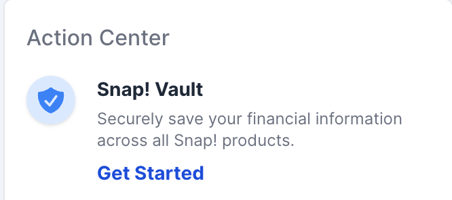
Option 2: From the Settings Tab Head to Settings, select Snap! Vault Financial Profile, then click on the specific Vault account you'd like to submit.
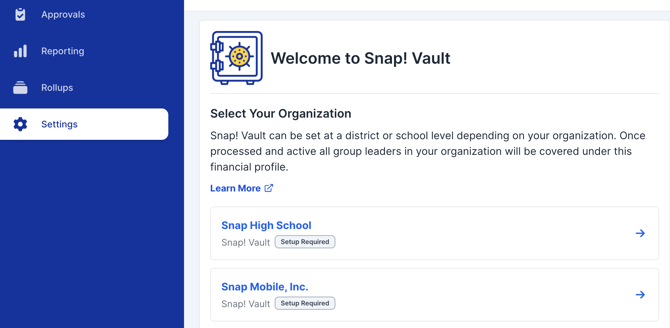
The Vault submission form will ask you to confirm and provide the following:
- Business Information (KYB) Verify that your organization's payable information is correct, including the legal payable name, EIN, and address exactly as they appear on file with the IRS.
- Personal Information (KYC) The submitting admin will need to provide their personal details, including their full legal name, personal address as it appears on a government-issued ID, date of birth, and full Social Security Number (SSN).
❗ As a reminder, Vault only requires this information to be submitted once per organization - meaning your Group Leaders won't need to go through the process again for every campaign.
How do I review the status of our Vault submission?
Each Vault submission is reviewed and carefully verified by our Payment Processor, Stripe. If its determined that further verification is needed, either KYC or KYB, our Support team will reach out to the Vault submitter directly.
To review the status of your Vault account, the easiest way to see the status would be through the Settings tab on your Dashboard.
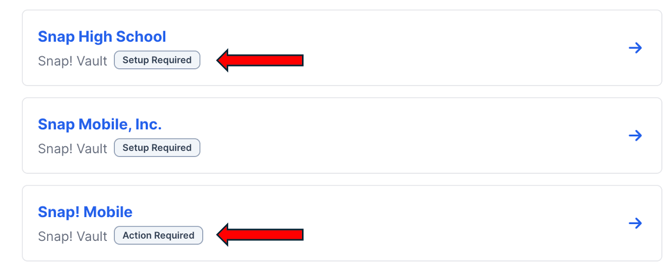
You will see a breakdown of the following statuses:
- Setup required - meaning the Vault profile has not been submitted
- Action required - further verification is needed. Our Support team will reach out to you directly if this status appears
- Approved - the submission is verified and good to go!
If you have any questions about how Vault works, please reach out to your Snap! representative or our support team at support@snapraise.com