
Group Leaders can now view Sponsor purchases directly within the Donations tab of their reporting page for improved visibility into fundraising activity.
Viewing Sponsor Purchases in Reporting
Sponsor purchases will now appear as a separate donation source within:
- The Donations pie chart
- The donor list on the Donations tab
- The Donations CSV export
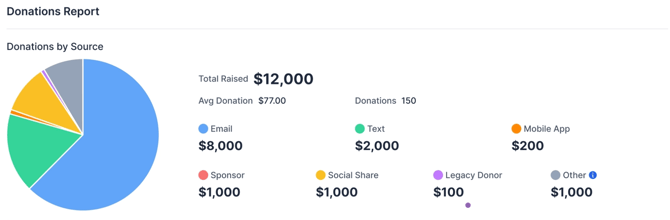
These purchases may originate from outreach methods such as emails, texts, or shared links, but they will no longer be grouped under Invite sources.
Instead, Sponsor purchases will be categorized separately as Sponsors.
Where to Find Sponsor Donations
Navigate to the Donations tab within Group Leader Reporting to view:
- Sponsor totals reflected in the donation breakdown pie chart
- Individual sponsor purchases listed alongside other donations
- Sponsor entries included in the CSV export
CSV Export Updates
When exporting donation data from the Donations tab:
- Sponsor purchases will appear with the source listed as Sponsors
- This makes it easier to filter, report on, and track sponsor-related fundraising activity separately from invite-driven donations
Additional Notes
- Sponsor purchases may still originate from shared campaign outreach like texts or emails
- These purchases are intentionally excluded from Invite source attribution to provide more accurate reporting visibility