
/Spend%20(Support)/Spend%20PNG.svg)
Payment Method Options
At Snap! Spend, our platform has two options for payment methods. They are:
1. Pay by Bank Account (Also known as ACH or Bank Payment)
2. Pay by Card
Paying by Bank Account
To pay by bank account, you will need your bank login credentials to sign in with Plaid, or your routing number and account number.
If you do not want to sign in to your bank with Plaid, see this article for linking your account and routing numbers directly.
If you encounter any errors upon adding a bank account, please click here for troubleshooting steps.
After adding your bank account, you will need to verify your identity. This is a NACHA (National Automated Clearing House Association) requirement. For more information on verifying your identity for bank accounts, visit our help desk article here.
Paying by Card
We accept Visa, Mastercard, American Express, Discover, JCB, Diners Club, and China UnionPay for payment. Simply select "card" as payment type and add all the required fields such as card number and expiration date.
A failed card payment does not result in any payment failure fees. For the billing address, you will need to use your personal billing address.
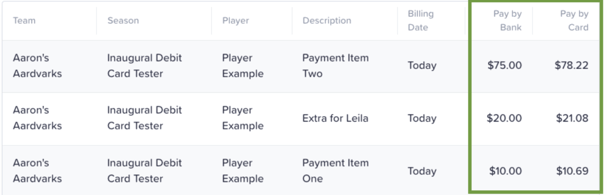
**Please note that the total amount for each payment type will be displayed prior to accepting and there is a small discount for utilizing ACH payment methods.
What Kind of Cards Are Accepted?
We accept Visa, Mastercard, American Express, Discover, JCB, Diners Club, and China UnionPay for payment.
Do I have to select AutoPay when approving payments?
There are two options for payment: AutoPay and Pay in Full. One of these options must be selected before continuing to authorize a payment. If you choose not to pay in full, you must select AutoPay. However, you can always stop AutoPay at a later date, the steps of which can be found here.
What if I need to change my payment method?
Please see our help article on how to change your payment method here.
What will my charge show up as on my bank statement?
Payments made through Snap! Spend will show up on your statements as the club name but may include Snap! Spend or Snap! Mobile as well.
Is there a way to change my due dates for payments?
Your program is responsible for setting the due dates for invoices. At Snap! Spend, we are unable to change the due dates on their behalf. If you have questions or concerns regarding due dates, contact your program directly.
Can I split payments between multiple cards?
There is no way to split payments between multiple payment methods. If you need to split up an invoice payment due to the amount, you can contact your club directly for help.
What if I need a refund?
If you need a refund, you can contact your program directly for help. Refunds can be issued directly by them based on their policies.
Still have questions or need help? Please reach out to us directly at spend.support@onsnap.com or by phone at 276-531-9260.
Snap! Spend is a financial technology company and is not a bank. Banking services provided by Thread Bank; Member FDIC. The Snap! Spend Visa Debit is issued by Thread Bank pursuant to a license from Visa U.S.A. Inc. and may be used everywhere Visa cards are accepted.
Your deposits qualify for up to a maximum of $2,500,000 in FDIC insurance coverage when placed at program banks in the Thread Bank deposit sweep program. Your deposits at each program bank become eligible for FDIC insurance up to $250,000, inclusive of any other deposits you may already hold at the bank in the same ownership capacity.
You can access the terms and conditions of the sweep program at https://thread.bank/sweep-disclosure/ and a list of program banks at https://thread.bank/program-banks/. Please contact customerservice@thread.bank with questions on the sweep program.